> For the complete documentation index, see [llms.txt](https://prohelp.assetpanda.com/llms.txt). Markdown versions of documentation pages are available by appending `.md` to page URLs; this page is available as [Markdown](https://prohelp.assetpanda.com/release-notes/2025-release-notes/july-2025-release-notes.md).
# July 2025 Release Notes
### Asset Panda Pro Web
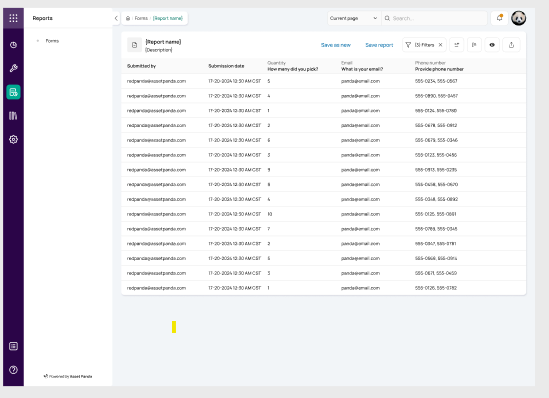
#### Optimize Reports for Enhanced Analysis
Access saved reports from form submissions to drive efficient data workflows. Leverage robust reporting capabilities to manage and analyze form data effectively.
**Generate and Customize Reports**
* Generating reports from selected form submission data incorporates form and collection fields, delivering comprehensive insights.
* Filtering and sorting submission data focuses analysis on critical information, enhancing decision-making.
* Hiding or showing specific columns tailors views, ensuring clarity and precision.
* Grouping submission data by key fields organizes complex datasets, enabling actionable insights.
**Save and Manage Reports**
* Exporting reports enables efficient sharing, accelerating collaboration.
* Saving customized report views with names, optional descriptions, associated forms, filters, visible columns, and sort settings ensures quick reuse, boosting productivity.
* Managing saved reports on a Reports Listing Page organizes data access, enhancing efficiency.
***
### Integrations
#### Integrating Microsoft Teams with Asset Panda
Connect Microsoft Teams to Asset Panda for real-time updates. Stay in sync by routing notifications through Webhook URLs to selected channels. Matching triggers to existing email and Slack options ensures familiar workflows. Sending instant messages drives collaboration, keeping everyone informed for sharper decisions.
#### [Okta Integration](/integrations-store/identity-and-access-management-iam/okta-integration.md)
Connect Okta to Asset Panda to automatically sync user records and enable secure logins for effortless management.
* **Field Mapping:** You can keep directories aligned by mapping fields like ID, name, email, and department to a dedicated collection, ensuring accurate data transfer.
* **Unique Identifiers:** Furthermore, choosing unique identifiers prevents duplicate records, so directories stay clean.
* **Advanced Filters:** Additionally, applying advanced filters before loading refines data quality, building a reliable foundation.
* **Delta Sync:** You can now utilize delta sync for efficient updates, keeping user records up to date.
* **Okta Logins:** Moreover, enabling Okta-based logins grants secure access, aligning with team needs.
* **Consistency with Other Integrations:** Finally, providing consistency with Azure AD and Google Workspace integrations offers a familiar experience.
#### Microsoft Active Directory On-Premises Integration
Connect Microsoft Active Directory on-premises to Asset Panda for seamless employee directory sync.
* **Installation Files:** You can download installation files directly from the web app, making setup straightforward.
* **Desktop Application:** Furthermore, using the desktop application connects to your AD environment, facilitating agent installation.
* **Import AD Users:** Additionally, importing AD users into the People collection populates records efficiently.
* **Configure Logins:** You can now configure AD users for login access, enabling secure authentication.
* **Workflows:** Finally, enabling one or both workflows eases user management, ensuring flexibility.